Scaling eCommerce Product Listings with Vision Models
TLDR: Fairmart validated a new customer segment and technical approach by building an internal onboarding tool that generated product listings from in-store photos. The resulting product listings passed QC and drove a 12% uplift in store revenue via eCommerce.
Context
At Fairmart, our initial ICP was minimarts with an inventory of 5–10k barcoded products, typically FMCGs. Our key technology was an eCommerce product listing generation pipeline that used UPC/EAN barcodes to identify a product and match it to our existing database of eCommerce-ready product listings.
It enabled small retail businesses with broad inventories to scale rapidly to online channels and lift top-line revenue by 10–25%. It worked very well for the initial ICP, but by Q3 2024 we had captured ~15% market share for this segment in Singapore. We had already acquired the early adopters, and growth was starting to slow.
Problem
Our Head of Sales was searching for new growth avenues and sourced a great opportunity with an adjacent customer profile selling beauty products. The problem the customer faced was similar to that of our existing ICP: they carried a broad inventory of ~2,000 products, wanted to integrate online sales channels to grow their business, yet didn’t have the manpower or resources to digitise their inventory. The blocker was that they primarily sold non-barcoded products, so we could not leverage our existing listing pipeline. The large inventory they had also disqualified traditional approaches such as using a photographer ($25,000+ in costs) or manual data entry (~160 hours of manual work).
A further constraint was data ingestion: our existing ICP’s barcoded products were stored in POS data, allowing us to extract and ingest that directly. Aside from some initial data cleanup, we generally could ingest their entire inventory in one go.
For this customer, it was not an option as they did not have a product database that carried anything we could use as a unique ID.
Initial data ingestion therefore had to be done manually by taking a photo of each product. We negotiated with the customer to commit manpower for this task, along with our own onboarding team. The total time commitment across both parties was ~15 hours spread across two individuals.
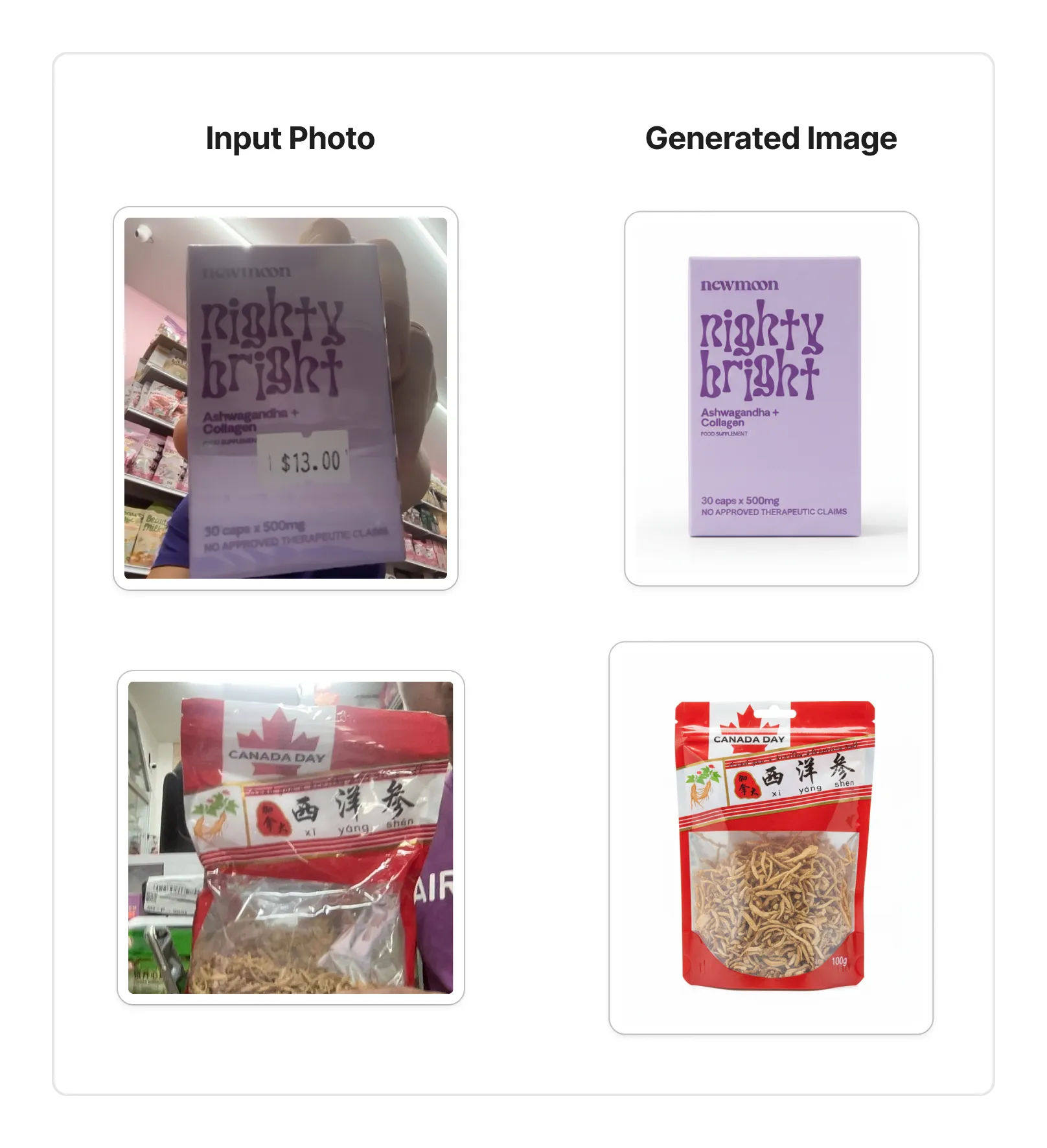
Objective
We treated this as an opportunity to validate whether using GVMs as part of our product listing pipeline could unlock a new customer segment. Our objectives were twofold:
- Leverage GVMs to generate product images of sufficient quality to pass Fairmart’s existing QC
- Achieve a 5% uplift in total store monthly revenue via eCommerce transactions within four weeks of onboarding
Solution
Our approach was to build a simple internal tool that would ingest rough product photos and output product data according to Fairmart’s bulk import specifications.
Solution components:
- User-facing web app for data ingestion and output
- Backend for processing
- Data storage
As we were using product photos as the starting point, we built a new data pipeline to incorporate GVM for image generation and VLM for product specifications.
Data pipeline:
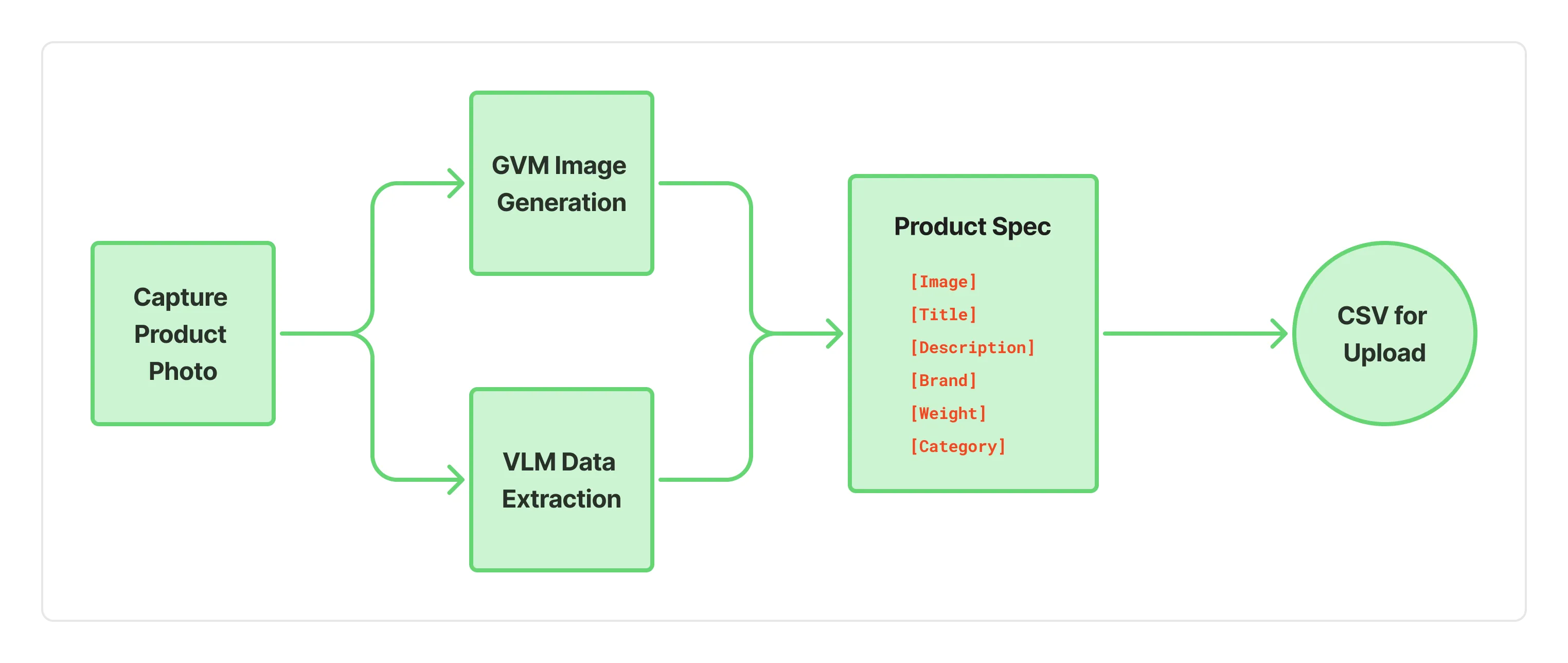
Our solution was to build a standalone internal onboarding tool for non-barcoded products, without the need to deploy engineering resources for an extensive build in our existing product. This approach unlocked a new onboarding flow to test commercial and technical repeatability across similar customer patterns.
Results
Our pipeline demonstrated that GVMs were capable of consistently generating quality images from original photos of inconsistent quality. Basic investments in the backend were sufficient to support a small group of users during intense usage. We quickly added support for up to 10 concurrent requests, which further accelerated the process.
Measuring success:
- 97% of images generated passed our QC process. When artefacts or errors occurred, we were able to resolve them by either taking a better-quality photo or doing another run.
- Achieved a 12% uplift in total store revenue via eCommerce over a four-week period, exceeding our goal by 230%.
What we would do differently
It was clear from the outset that the fastest approach to capturing product photos was to use mobile phones. However, we chose to build a desktop workflow first using the laptop camera. Building mobile-first would have made more sense since mobile phone cameras were our primary data ingestion source.
Tech stack: React Node.js GVM VLM Railway Postgres